Setting Ollama
This guide shows you how to use alternative AI models with Claude Code and Quack — from free cloud models via Ollama to paid coding plans from Chinese AI labs. Save your Claude quota for production work, and run experiments on cheaper (or free) models.
Why Use Alternative Models?
Claude is unmatched for complex architecture and production code. But experiments, side projects, and quick iterations burn through your quota fast. Alternative models let you:
- Extend your Claude Max plan to last the full month
- Run experiments for free via Ollama's cloud tier
- Get coding plans from $3/month with surprisingly capable models
Step 1: Install Ollama
Before using alternative models in Quack or Claude Code, you need Ollama running on your machine. Ollama acts as a local proxy that speaks the Anthropic API protocol.
Install
Download from ollama.com, or use your package manager:
macOS:
bashbrew install ollama
Linux:
bashcurl -fsSL https://ollama.com/install.sh | sh
Windows: Download the installer from ollama.com and run it.
Ollama starts as a background service on localhost:11434.
Sign In (Required for Cloud Models)
Cloud models are hosted on Ollama's infrastructure — free, no GPU needed. To access them, create an account on ollama.com, then:
bashollama signin
Verify It's Running
bashcurl http://localhost:11434/api/tags
You should see a JSON response. If you get a connection error, start Ollama manually.
Test a Cloud Model
Try running a model to make sure everything works:
bashollama run kimi-k2.5:cloud
Cloud models have the :cloud suffix. They run on Ollama's servers, so they don't use your local resources.
Step 2: Configure in Quack
Once Ollama is installed and running, Quack can connect to it with a few clicks.
Open Settings
Click Settings in the bottom-left corner, then navigate to Claude Code.
Select Provider
Under LLM Provider, change the Provider dropdown from Anthropic to Ollama (Local).
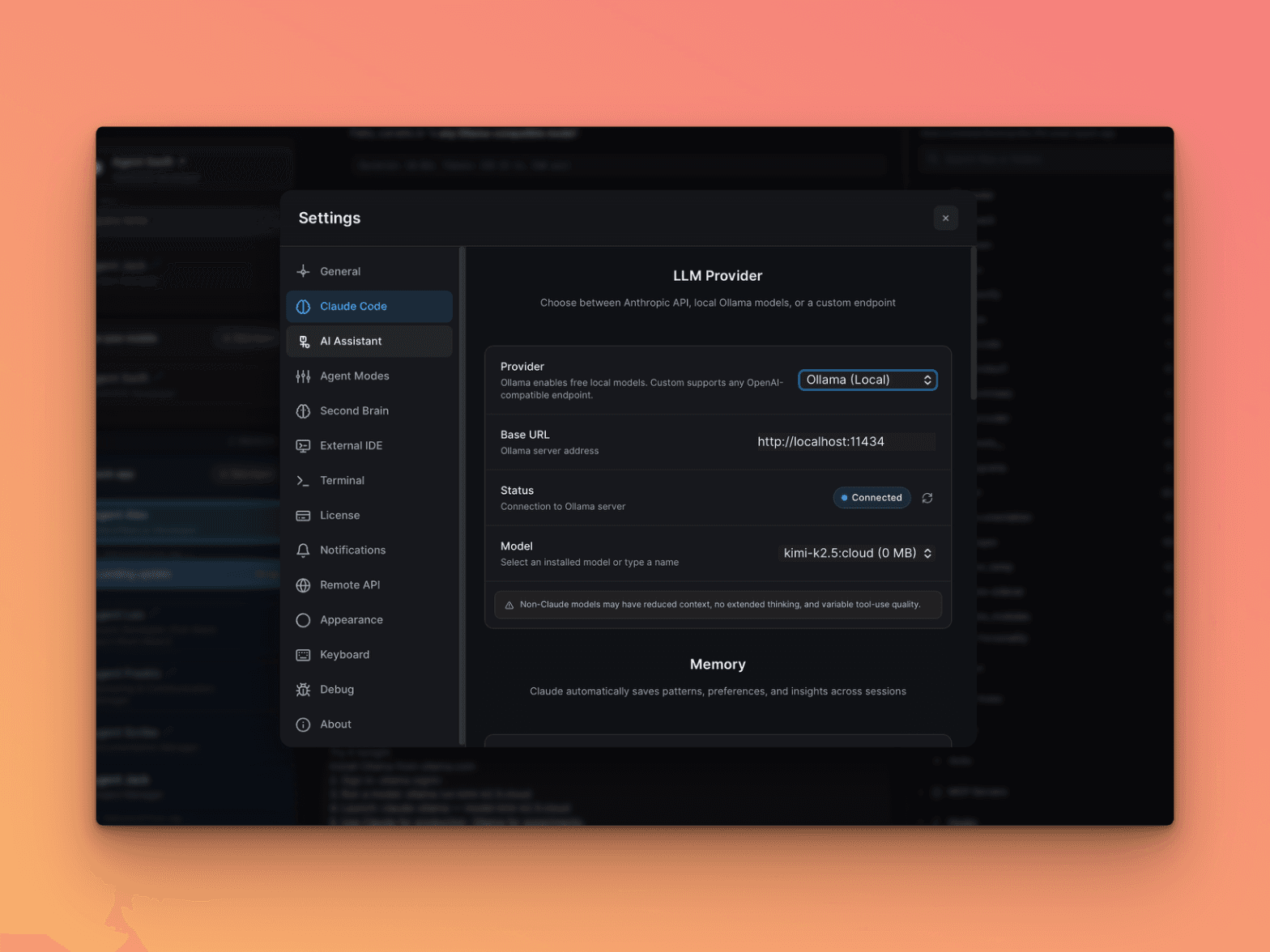
The Base URL auto-fills to http://localhost:11434. If Ollama is running, you'll see a green Connected status.
Pick a Model
Choose from the Model dropdown or type a model name manually. Recommended cloud models:
kimi-k2.5:cloud— Best for TypeScript/React workminimax-m2.5:cloud— Fast code reviews and refactoringglm-5:cloud— Solid all-rounder
Start a New Chat
The provider switch takes effect on the next chat. You'll see the model name in the status bar at the bottom.
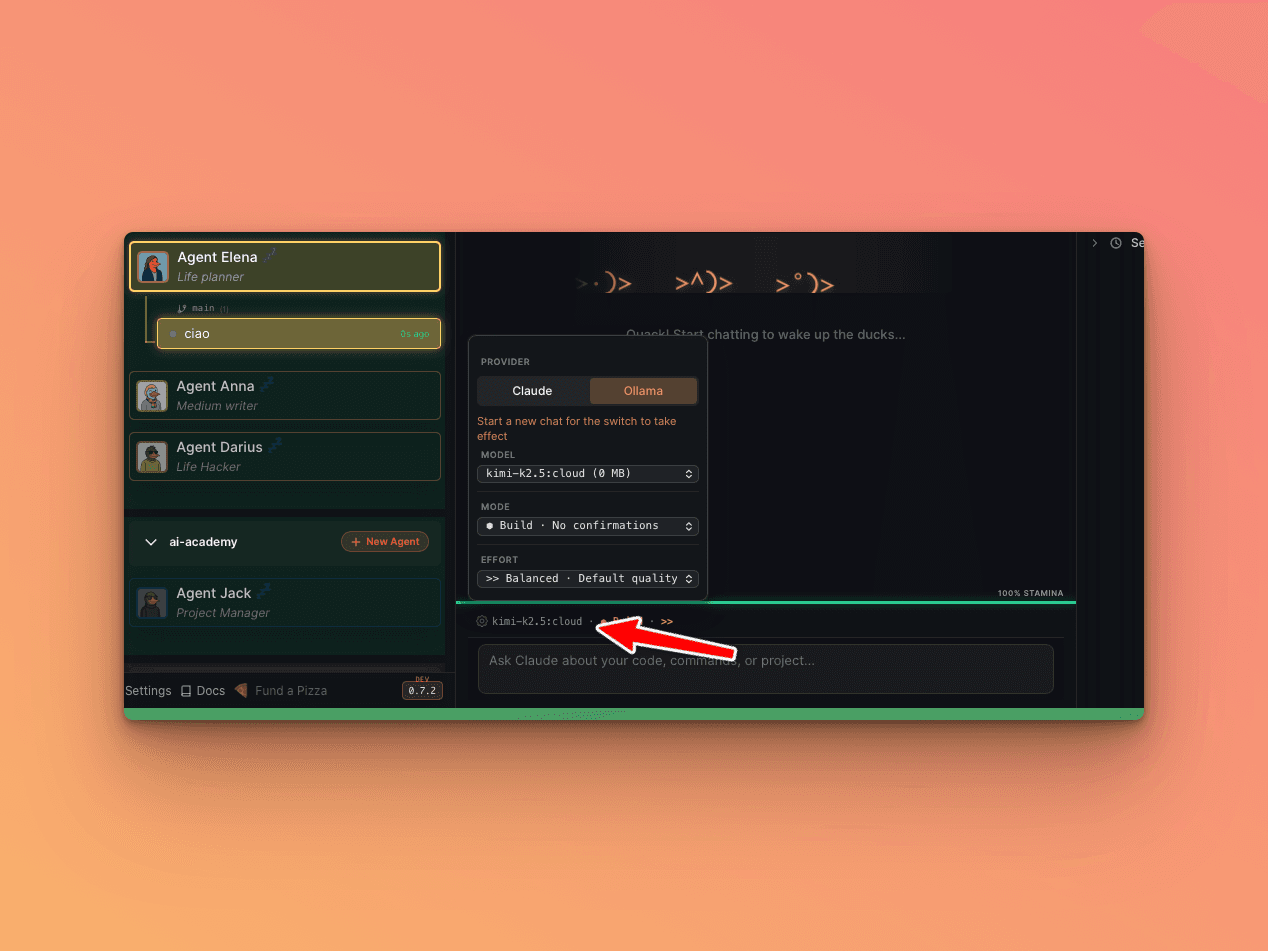
Important: You cannot switch providers mid-session. Always start a fresh chat when changing models.
Alternative: Claude Code CLI
If you prefer the terminal (without Quack), two environment variables are all you need:
bashANTHROPIC_BASE_URL=http://localhost:11434 ANTHROPIC_AUTH_TOKEN=ollama claude --model kimi-k2.5:cloud
Claude Code connects to Ollama instead of Anthropic. Same interface, same tools — different brain.
Save Yourself Some Typing
Add an alias to your ~/.zshrc (or ~/.bashrc):
bashalias claude-ollama='ANTHROPIC_BASE_URL=http://localhost:11434 ANTHROPIC_AUTH_TOKEN=ollama claude'
Then:
bashclaude-ollama --model minimax-m2.5:cloud
Recommended Models
Kimi K2.5 (Moonshot AI, Beijing)
bashollama run kimi-k2.5:cloud
Best for: TypeScript, React components, code pattern understanding. Moments where you forget you're not using Claude.
MiniMax M2.5 (Shanghai)
bashollama run minimax-m2.5:cloud
Best for: Fast responses, code reviews, refactoring. Solid reasoning for quick tasks.
GLM-5 (Zhipu AI)
bashollama run glm-5:cloud
Best for: General tasks, documentation, analysis. Consistently good at everything.
Going Serious: Paid Coding Plans
When you need guaranteed availability and higher rate limits, each provider offers dedicated subscriptions.
GLM (Zhipu AI / Z.ai) — From $3/month
The cheapest option. Visit z.ai/subscribe:
| Plan | Price | Prompts | Hours |
|---|---|---|---|
| Lite | $3/month | 120 | 5 |
| Pro | $15/month | 600 | 5 |
bashANTHROPIC_BASE_URL=https://api.z.ai/api/anthropic \
ANTHROPIC_AUTH_TOKEN=your-zhipu-api-key \
claude --model glm-4.7
MiniMax — From $10/month
Visit platform.minimax.io:
| Plan | Price | Prompts | Hours |
|---|---|---|---|
| Starter | $10/month | 100 | 5 |
| Plus | $20/month | 300 | 5 |
| Max | $50/month | 1000 | 5 |
bashANTHROPIC_BASE_URL=https://api.minimax.io/anthropic \
ANTHROPIC_AUTH_TOKEN=your-minimax-api-key \
claude --model MiniMax-M2.5
Kimi (Moonshot AI) — Pay Per Token
No subscription — pay as you go:
- Input: $0.60 / million tokens
- Output: $2.50 / million tokens
For comparison, Claude Opus charges $5/$25 per million tokens. Kimi is ~10x cheaper.
bashANTHROPIC_BASE_URL=https://api.moonshot.ai/anthropic \
ANTHROPIC_AUTH_TOKEN=your-moonshot-api-key \
claude --model kimi-k2.5
Cost Comparison
| Provider | Monthly Cost | Best For |
|---|---|---|
| Claude Code Max | ~$90/month | Production code, architecture |
| MiniMax Starter | $10/month | Experiments, side projects |
| GLM Lite | $3/month | Budget option, surprisingly capable |
| Kimi (pay-per-token) | ~$5-15/month | Top-tier Chinese model |
| Ollama free tier | $0 | Free cloud models, rate-limited |
Recommended setup: Claude Max for production + MiniMax Starter ($10) for experiments. Total: ~$100/month for practically unlimited AI coding.
Gotchas
- Install Ollama first. Quack needs Ollama running locally before it can connect. No Ollama = no alternative models.
- No mid-session switching. Start a fresh chat when changing providers. Mixing providers causes invalid thinking block signature errors.
- Cloud models need
ollama signin. Without it, you only get local models. - Non-Claude models may have reduced context, no extended thinking, and variable tool-use quality. Quack shows a warning banner about this.
- Rate limits on free tier. Ollama's cloud models are rate-limited. For heavy use, get a paid plan.